 MindfulAccess
How to stop watching reels without deleting Instagram
Deleting Instagram means losing your messages and your friends’ stories. You don’t have to. The habit lives in one feed, so limit that feed and keep the rest.
See how many you actually watch
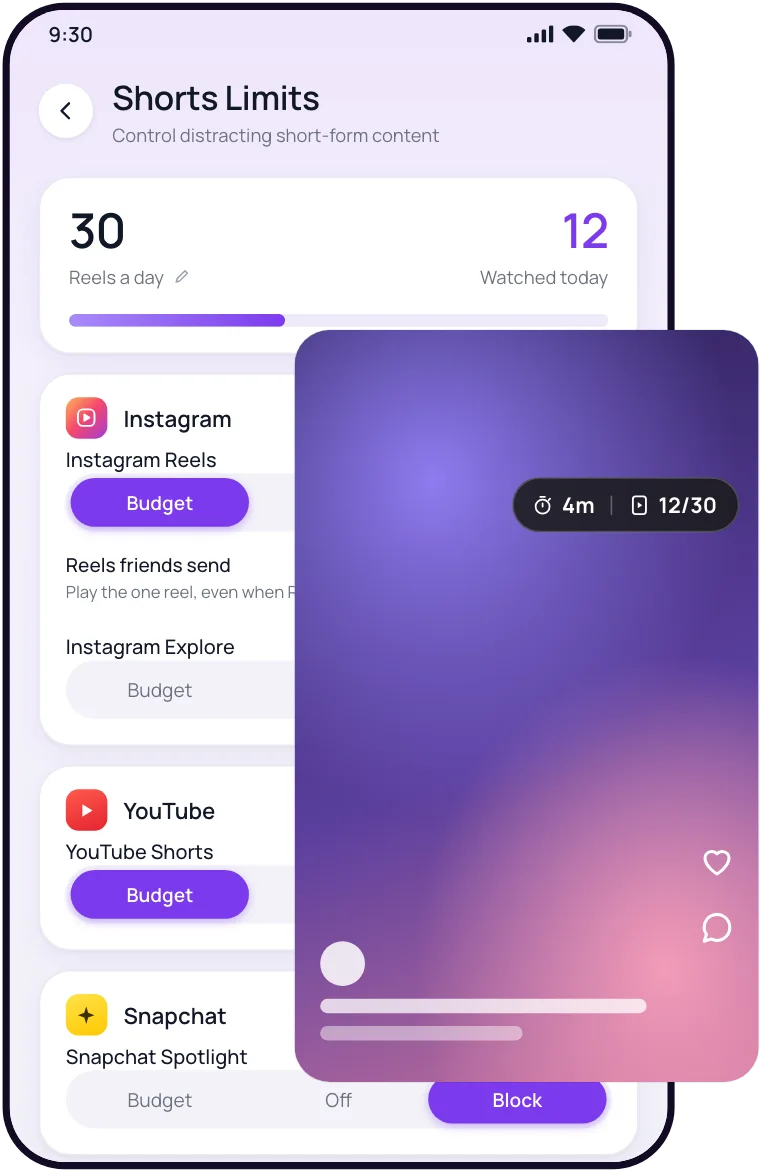
Most people guess low. MindfulAccess puts a small counter on Reels and Shorts while you scroll, so the number is in front of you, not in a report you never open. Seeing “40” at 11 pm is often enough to stop.
Give reels a daily limit
- Install MindfulAccess and turn on Accessibility when it asks. That’s how the app sees what’s on screen.
- On Overview, tap Shorts Limits.
- Set Instagram Reels to Budget.
- At the top, choose Reels and a number, like 30 a day, or Minutes if you’d rather count time. When it’s used up, Reels closes until midnight.
Don’t let it move to another app
The same limit can cover YouTube Shorts, Facebook Reels, Snapchat Spotlight and Reddit. Turn them to Budget too, and the minutes don’t just move somewhere else.
Or block the feed completely
Set Instagram Reels to Block. Messages, Stories and your feed keep working. If you want reels your friends send to still play, turn on Reels friends send right below it: a reel opened from a chat plays, and swiping on takes you back to the chat. See block Instagram Reels and keep your messages.
Small changes that help
- Move Instagram off your home screen, so opening it takes a decision.
- Turn off notifications except messages.
- Charge your phone outside the bedroom.
MindfulAccess is free on Android. No ads, no account.

More guides
- How to limit app usage on Android
- Block Instagram Reels, keep your messages
- Block YouTube Shorts on Android
- Block Facebook Reels on Android
- How to stop doomscrolling at night
- Block apps at certain times
- How to reduce screen time on Android
- How to stop doomscrolling
- Block apps without parental controls
- Limit how many times you open an app