 MindfulAccess
Limit how many times a day you open an app
Most screen time tools count minutes, but the habit is the reaching: dozens of quick checks a day. MindfulAccess lets you give an app a few opens a day. When they’re used up, it stays closed until tomorrow.
Set an open limit
- Install MindfulAccess and turn on Accessibility when it asks. That’s how the app sees what’s on screen.
- On Overview, tap Reflection Schedules and create a schedule.
- Choose the apps, then tap Continue.
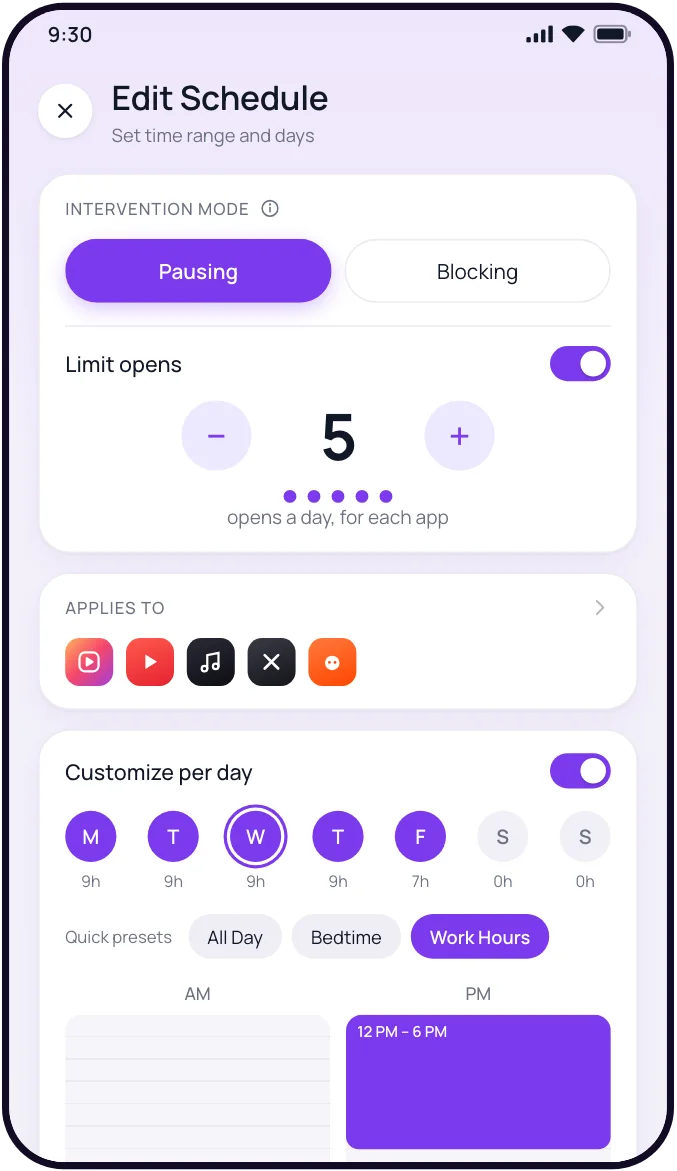
- Pick Pausing, turn on Limit opens and choose a number, like 5.
- Pick when it applies, like All Day or Work Hours, and tap Save.
How opens are counted
Each app in the schedule gets its own count. Every time you reach for it, a short pause shows how many opens you have left. Closing from the pause costs nothing; only choosing to continue uses an open.
When they’re used up, the app stays closed until tomorrow, or until the schedule ends. If two schedules cover the same app, the stricter limit wins.
Make it stick
In Settings, turn on Lock schedules. You can make a schedule stricter any time, but loosening or deleting it waits for a daily 30-minute window you choose.
The built-in option
Android’s Digital Wellbeing limits apps by minutes, not by how often you open them. If quick checks are your habit, a minutes timer rarely runs out; an open limit does.
MindfulAccess is free on Android. No ads, no account.

More guides
- How to limit app usage on Android
- How to stop watching reels
- Block Instagram Reels, keep your messages
- Block YouTube Shorts on Android
- Block Facebook Reels on Android
- How to stop doomscrolling at night
- Block apps at certain times
- How to reduce screen time on Android
- How to stop doomscrolling
- Block apps without parental controls