 MindfulAccess
How to limit app usage on Android
There are three kinds of limit, and they suit different habits: a daily time cap, set hours when an app is off limits, and a cap on how often you open it. Android has the first built in. MindfulAccess adds the other two.
A daily time cap, built into Android
Open Settings, then Digital Wellbeing & parental controls, pick the app from the dashboard and set an App timer. When the time is up, the app is paused until midnight. On Samsung phones the same tool is under Digital Wellbeing and parental controls → App timers.
It counts minutes only, and it’s easy to switch off from the same screen. Quick checks of a minute or two rarely add up to the limit, which is why it often doesn’t change the habit.
Set hours, with a schedule
- Install MindfulAccess and turn on Accessibility when it asks. That’s how the app sees what’s on screen.
- On Overview, tap Reflection Schedules and create a schedule.
- Choose the apps, then tap Continue.
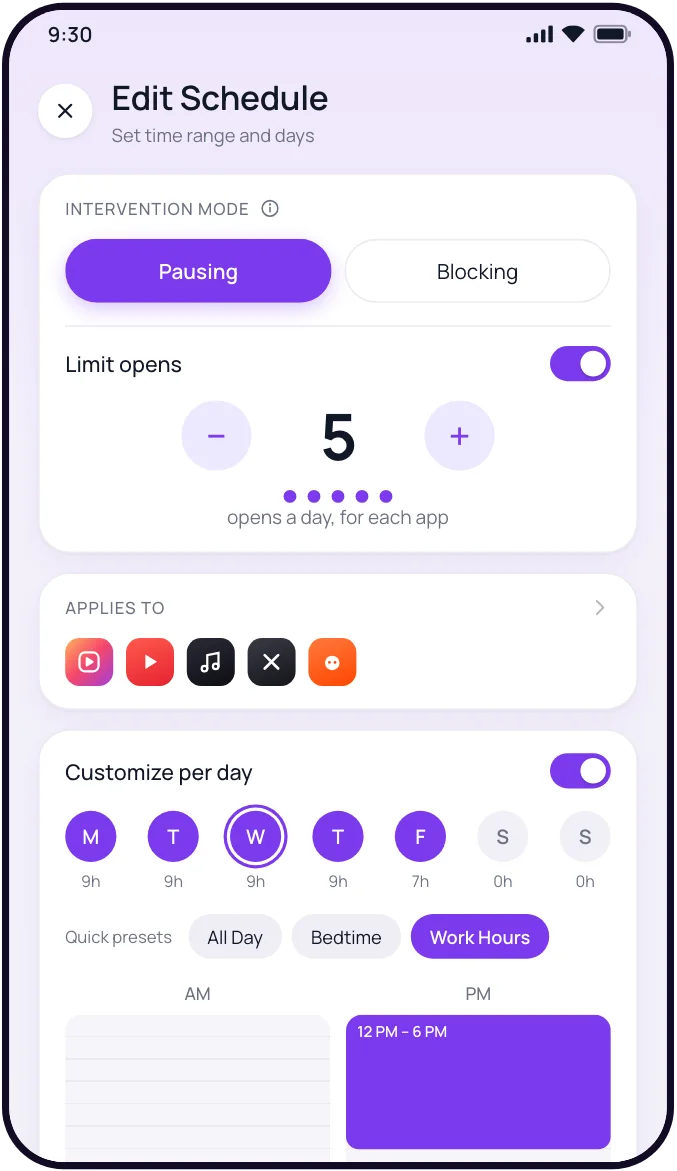
- Pick Pausing for a calm pause each time you open them, or Blocking to keep them closed during those hours.
- Pick the hours: All Day, Bedtime (10 pm to 7 am), Work Hours (9 am to 5 pm), or your own, different for each day. Tap Save.
Or a few opens a day
In the same schedule, turn on Limit opens and pick a number, like 5. Each open goes through the pause, which shows how many are left. When they’re used up, the app stays closed until tomorrow. More in limit how many times you open an app.
Make limits hard to undo
In Settings, turn on Lock schedules: you can make a schedule stricter any time, but loosening or deleting it waits for a daily 30-minute window you choose. Tamper protection stops MindfulAccess being uninstalled or force-stopped outside that window.
MindfulAccess is free on Android. No ads, no account.

More guides
- How to stop watching reels
- Block Instagram Reels, keep your messages
- Block YouTube Shorts on Android
- Block Facebook Reels on Android
- How to stop doomscrolling at night
- Block apps at certain times
- How to reduce screen time on Android
- How to stop doomscrolling
- Block apps without parental controls
- Limit how many times you open an app